Images are an essential aspect to any successful ecommerce business. You’ll need great imagery for your products, your website as a whole and to truly make an impact with any marketing campaigns you want to run. While taking and producing your own photos, or paying someone to do it for you, seems like the most obvious solution it can actually be extremely costly and slow. If you’re a small company, paying someone to produce original photos for you won’t really seem like a viable option. Instead, you’ll need to turn to the world of online stock photography.
Paid vs. free
Stock photography is a wonderful concept that has divided itself into two different sectors, the paid and the free. Choosing which one you are going to dive into will largely depend on your budget. If you have room in your budget to set some money aside to pay for some stock photography, that would be great as it really opens up your options. However, if you’d rather not spend the money on this at the minute, then that’s okay too. At the end of this blog we’ve included some of our recommendations for websites for both paid and free stock photography. They’re a great way to get you started, but by no means is it an exhaustive list of what you’ll find out there. Just always remember to check your usage rights before deciding on a picture.
Usage rights
Using any old image off of Google can come with some serious ramifications for you and your business. If the image you use is copyrighted, you could be sued for infringement, and that’s certainly not something you want to be dealing with. This is why finding images on reputable sites that display your usage rights to you in easy to understand ways is the right way to go. Even if you’re planning on using a free stock photography website, don’t just assume that you can take any picture and use it however you want. When checking your usage rights you’ll want to make sure you can use the image for commercial purposes. Additionally, make sure you check if and how you should give credit to the person who supplied the image. Paid sites, such as Shutterstock, tend to offer multiple options for licenses (at different price ranges), and which one you choose will depend on where you plan on using the image.
As an example, let's take a look at these two Shutterstock licenses:
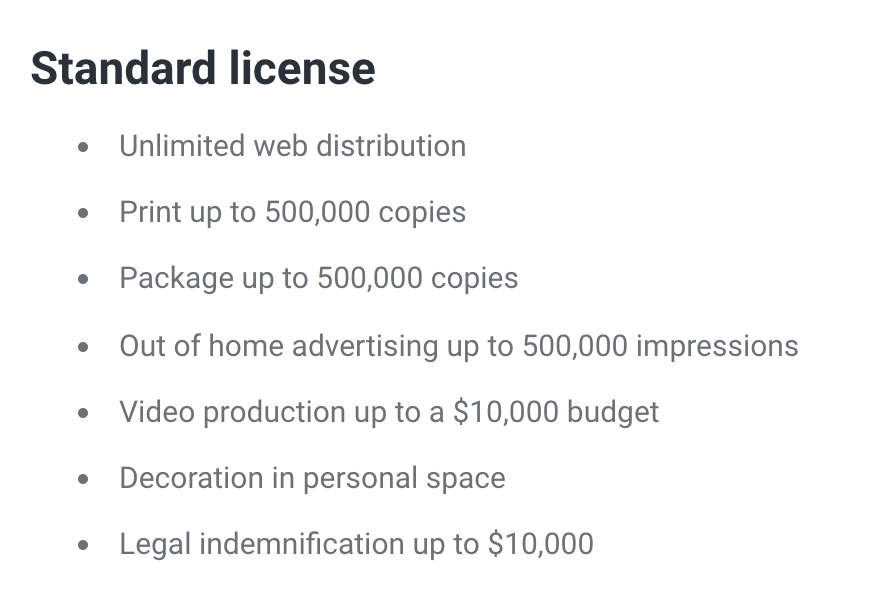
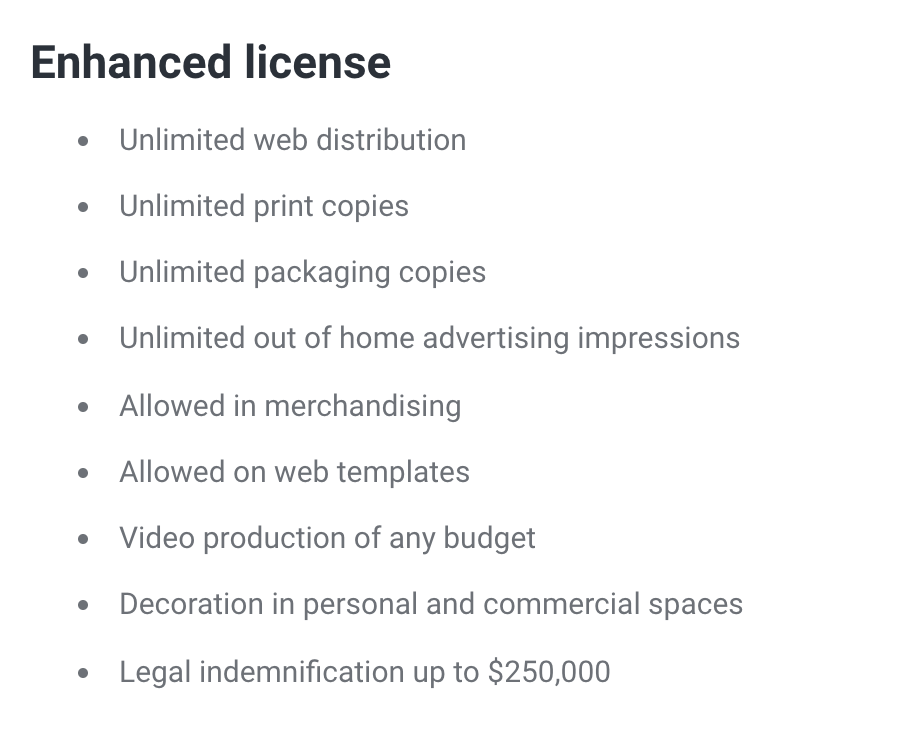
With their standard licence you're limited to how many times you can use a physical copy of the image, but you can use it an unlimited amount on social media, websites and blogs. Be careful if you plan to use an image from this site as a product or category image as the standard licence doesn't cover you for that. To use an image for that purpose you would need to upgrade to the enhanced license which will end up costing you extra, but could be worth it if it's an image you really want.
These examples are just from one of the sites you might end up getting your images from, and each site comes with a different standard for their licensing. Keep in mind that just because you've purchased the use of an image doesn't mean you get to use it anywhere and anyhow you want. The picture still belongs to someone else; you're just paying for the privilege of using it how they choose to allow you to.
Think before you look
The number of images that are available to you, whether you choose to use ones you have to pay for or not, can be really overwhelming. Before you start searching through any website with a load of images on it you’ll want to really think about what it is that you’re looking for. The ‘I’ll know it when I see it approach’ might work for you, but it could take you hours to find anything remotely decent, and chances are you need to be devoting that time to other aspects of your business.
Try to break down the specifics of what you want. For example, starting with a keyword such as ‘winter’ is helpful if you’re just generally looking for wintery images, but it won’t help you to quickly find pictures of a snowflake. Start to make a list of all of the search terms you can use to help you find images you need.
Using multiple keywords as your search term can help you get to what you’re looking for quickly. Typing ‘Gym’ into your search bar will find you 1,793,129 search results on Adobe Stock, but making your search term longer and more specific, such as ‘people working out in gym’ narrows those results down to ‘63,727’. While that still sounds like a lot of images, the most relevant to your search term of all of those thousands should appear first to you making it much easier to find what you were looking for.
Creating this ‘shopping list’ of what you’re hoping to find to suit your store and the brand you are trying to create will help reduce the time it takes for you to find some incredible images.

Tips to help you find the right images
So you’ve created your ‘shopping list’ now it’s time to actually start looking. When searching for images on a website start by inputting your list of keywords into the search box to see where that gets you.
Tip #1 - Use filters!
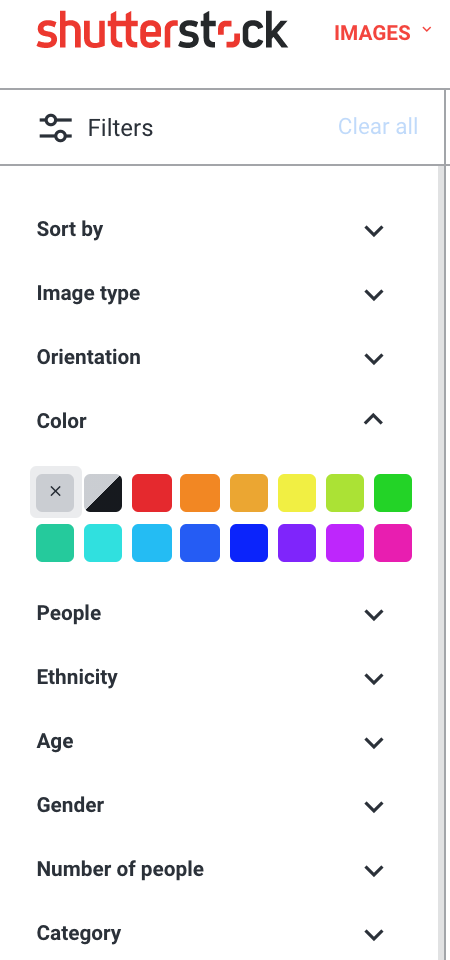
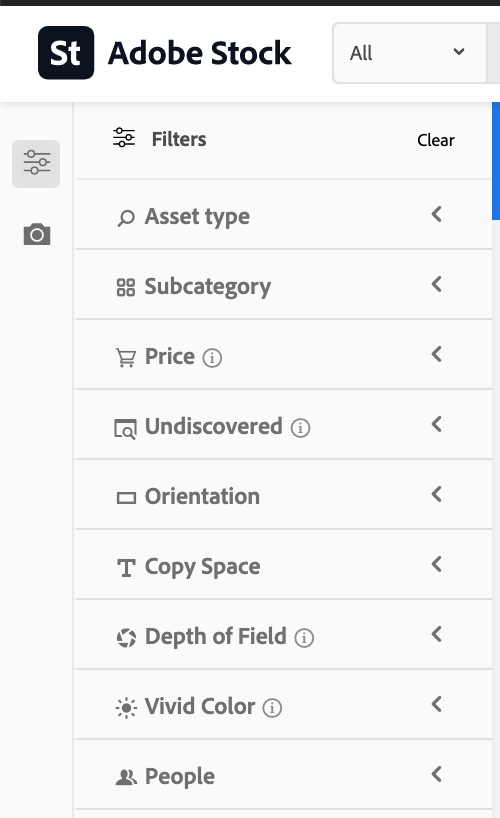
If one of your search terms still leaves you with thousands of images, you should utilise any filters that the website has to offer as this can help you narrow things down in ways you didn’t think of. These filters can be anything from the orientation of the image, the age of the people in the image and even the colouring of the image.
The colouring of the image can be especially helpful if you have chosen specific colours to associate with your brand and you were really hoping to find images to suit that.
Typically the websites with images you have to pay for offer you much better filter options which can really help reduce the amount of time it takes you to find images.
Tip #2 - See how much the image is being used already

A downside to stock photography (particularly to free stock photography) is that the images you use can be accessed and used by just about anyone. You’re not going to want to use an image that’s in use by a lot of other sites as you’ll want to stand out to your customers and use photos they don’t see frequently. While it’s difficult to know exactly how many sites are using a specific image, there is a tool that can help you garner an idea of how well-used an image is. Place the image you want to use into https://tineye.com/ to then see search results for about how many sites are using that image already. This site does have some limitations (such as Facebook and Instagram not allowing it to scan images on their sites), so it’s results won’t be 100% accurate, but it’ll give you a good idea to see if that image is worth having.
Make the images yours
Licensing permitting, once you’ve downloaded your image consider making it more your own by adding some editing touches to it. This means doing anything from cropping the image and changing the colouring to adding filters and text. By customising the images you help them to better integrate into your website and your brand. It also helps ensure that the images you use won’t look the same as when someone else uses them.
Free and paid website recommendations
The following recommendations are simply provided to help you get started with finding stock photography. You should always check the license for each and every image that you plan on using to ensure you are well within your rights.
Free
Unsplash – all images on Unsplash are free to use and modify and are covered by the Unsplash license.
Pexels.com - all images on Pexels are free to use and modify for commercial and personal purposes. You should check the Pexels license to see how the images cannot be used.
Paid
Shutterstock - Shutterstock is one of the biggest and most popular stock photography websites out there, giving you access to millions of quality images. You’ll always have new images to pick through with thousands of new images added daily.
Getty Images - Getty Images tend to be more expensive, but you are more likely to use unique images not in mass use if you choose to find your images here. You also have the option to buy out the image so that only you can use it for a duration that you can decide or for forever if that’s what you want.
Adobe Stock - This service is owned by Adobe which means you can easily access the millions of images hosted on the site right through your Adobe editing software, like Photoshop and Illustrator.
Related articles
Read more in INSPIRATION FOR IMAGES:
A step by step guide to resizing images with Pixlr


 Ecommerce


