
Create your own ecommerce website and start selling successfully with ShopWired today

Create your own ecommerce website and start selling successfully with ShopWired today

Adding a re-order feature

Adding a re-order feature

Before you proceed:
The following article contains information that requires you to have some prior knowledge about coding in order to correctly implement the proposed change to your theme. If done incorrectly alterations made to your theme’s code can negatively impact your website causing visual and performance issues. Therefore, we strongly recommend that you only undertake this effort if you are completely confident that you know what you’re doing. If you have no coding experience at all, aren’t entirely comfortable following the instructions in this article or if you simply don’t understand the instructions then we recommend you instead contact us, and our coding team will complete the work for you for a set fee.


Pro tip!

If you are using a version 3 or version 4 theme you won't need to add this code to your theme's files as this feature is automatically included.


Adding a re-order feature to your ShopWired website would allow your customers to click a button on a previous order they've placed to automatically add all of the products in that order to the basket.

Please note that a product in an order might not be added to the basket if:

• The product is out of stock
• The selected variation no longer exists
• The product choice or extras no longer exist or have been renamed

This feature does not work for products with variations where the variations use the 'all variants' feature (i.e. where variations are not configured individually).
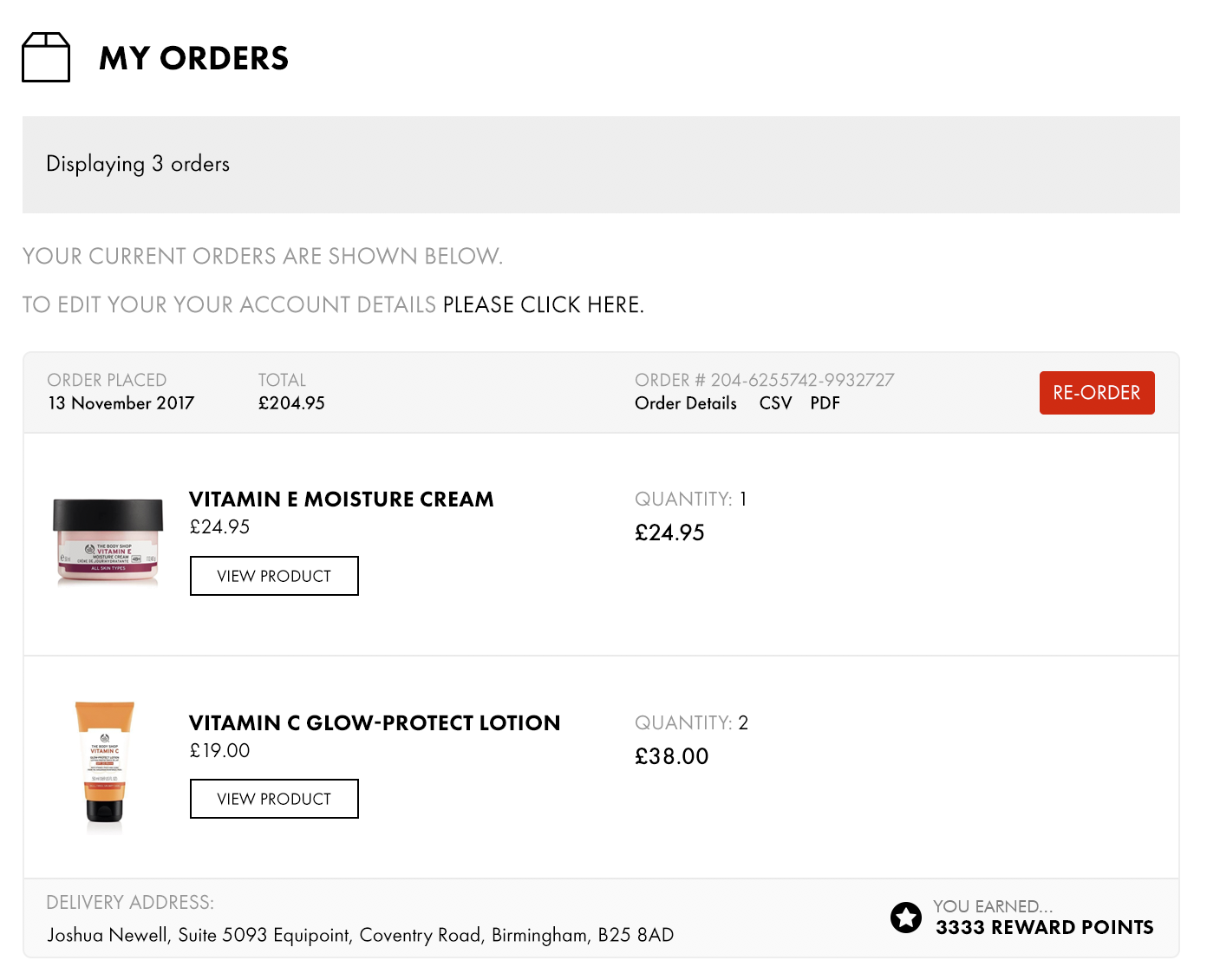
The re-order function is as simple as the user clicking a button, similar to the example shown above.


Adding the code

The button is a simple button contained in a form.
You have to send a POST request to the order URL with a value of add_to_basket set to true/1.

<form action="{{ order.url }}" method="post">
         <input type="hidden" name="add_to_basket" value="1">
         <button type="submit">
                Re-Order
         </button>
</form>

If you're adding the button to the account home page (which displays all of the orders the customer has placed) then each order will need its own button, so this will need to be included within {% for order in orders %}.

If you're adding the button to the account order page (which displays information about an individual order) then the button will only be displayed once.

Latest Articles

EU Accessibility Regulations Are Coming — Here’s What Nordic Merchants Need to KnowEcommerce

EU Accessibility Regulations Are Coming — Here’s What Nordic Merchants Need to Know

From 28 June 2025, new EU regulations will require all consumer-facing webshops to meet certain accessibility standards. Known as the European Accessibility Act (EAA), the goal is to make online stores...

Read more

Understanding the behavior of B2B buyers in 2024B2B Ecommerce

Understanding the behavior of B2B buyers in 2024

Navigating the complexities of B2B purchasing requires an in-depth understanding of buyer behavior, which has evolved significantly over recent years. Companies today must adapt to these changing dynamics...

Read more

Getting Started With Google ShoppingMarketing

Getting Started With Google Shopping

Google Shopping is a powerful platform that lets online stores showcase their products on both the Google results page and Google Shopping tab. This unique advertising opportunity helps brands put...

Read more

8 Ways to Improve Customer ServiceEcommerce business management

8 Ways to Improve Customer Service

The success of your ecommerce store depends on more than just top-notch products and savvy marketing. According to a study by Salesforce, 88% of customers said their whole experience with a business is...

Read more

Upgrading Magento: When Costs Outweigh BenefitsEcommerce business management

Upgrading Magento: When Costs Outweigh Benefits

When Magento was released back in 2007, the appeal of an open-source ecommerce platform quickly captured the attention of businesses wanting complete control over their online store. However, for...

Read more

AI in Ecommerce- Tips and ChallengesEcommerce business management

AI in Ecommerce- Tips and Challenges

Artificial intelligence (AI) is revolutionizing the ecommerce landscape.By 2030, the AI-enabled ecommerce market is estimated to reach $16.8 billion, growing by a rate of 15.7% CAGR in the next 8 years....

Read more

6 Signs You've outgrown your Ecommerce PlatformEcommerce

6 Signs You've outgrown your Ecommerce Platform

In the ever-evolving landscape of ecommerce, the success of your business hinges not only on the products you sell but also on the robustness of your ecommerce platform.As we navigate through an era where...

Read more

Website Migration SEO- How To Maintain SEO When Migrating Your WebsiteMarketing

Website Migration SEO- How To Maintain SEO When Migrating Your Website

When your current platform no longer meets your evolving needs, it might be time to consider a website migration. Such a transition, though often necessary, isn't just about shifting to a new platform;...

Read more

Start your 14 day free trial today

See why ShopWired is one of Europe's favourite ecommerce platform and start building your ecommerce website today.

No obligation, no credit card, no commitment, no contract